Choosing a China-made industrial inkjet printer starts with the production task, not the brochure. The best system for a packaging line may be wrong for metal parts, cables, or cartons. Buyers should match printhead design, ink type, and print distance to the actual material and line speed. A glossy code on a clean carton is one thing. A durable mark on a curved component is another.
So, what features are important in industrial inkjet technology? Look for readable print at the required speed, reliable operation across long shifts, and straightforward integration with conveyors, sensors, and production software. Check how the printer handles dust, vibration, temperature changes, and routine cleaning. Ask for sample prints on your own substrate. Small details matter. A nozzle that clogs during a busy shift can cost more than a modest difference in purchase price. A specification sheet can look convincing, yet leave out the maintenance time your team will actually face.
Compare ink availability, spare-part lead times, operator training, and local technical support before selecting a supplier. Request clear information about warranty terms and performance testing, then verify important claims with a trial on your line. Not every factory can provide the same level of documentation or after-sales service. That deserves a careful question, not an assumption. A practical buying decision balances print quality, uptime, total operating cost, and support your staff can reach when production stops.
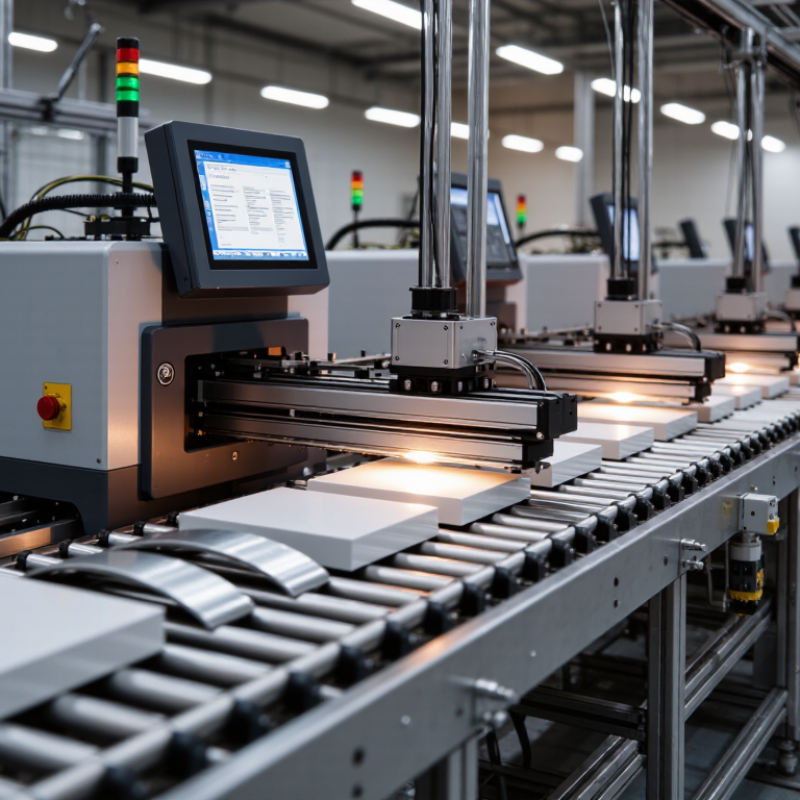
An industrial inkjet printer in China is defined less by its assembly location than by its working discipline. It must print reliably across long production shifts, often in dust, heat, or changing humidity. Downtime is expensive. A suitable machine should handle cartons, cables, metal parts, glass, or plastic surfaces without constant manual adjustment. Stable ink delivery, accurate sensors, and clear printheads are essential.
Buyers should examine more than speed and resolution. A practical evaluation checks print quality at the real line speed, not only in a showroom. The system should support readable dates, batch codes, barcodes, and small graphics. It also needs simple integration with conveyors, scanners, factory software, and safety controls. Sealed components can reduce contamination, while accessible filters and printheads make routine maintenance faster.
Ink selection deserves careful attention. Different surfaces may require fast-drying, high-contrast, or solvent-resistant performance. Test samples from actual production materials before ordering. No specification is perfect. A printer rated for high speed may lose clarity when the surface vibrates or curves. Operators may also need training, although this requirement is often underestimated. Reliable technical support, documented maintenance procedures, and traceable quality checks help buyers judge long-term value rather than choosing by price alone.
Printhead technology often decides whether an industrial printer feels fast or merely looks fast. Smithers’ 2024 report, The Future of Inkjet Printing to 2029, values the global inkjet market at about $87.2 billion in 2024. It forecasts growth to approximately $103.2 billion by 2029. This expansion raises buyer expectations for stable production, not impressive demonstrations.
Firing frequency affects line speed, but drop placement controls usable speed. Modern industrial printheads can deliver thousands of droplets each second. Higher nozzle density can reduce visible banding and limit extra passes. Smaller drops sharpen fine text and edge details. Larger drops improve solid coverage on rough cartons, films, and coated boards. The trade-off is real. Tiny drops may struggle with dusty surfaces or unstable air movement.
In production trials, inspect the waveform, nozzle redundancy, and ink recirculation system. These features help maintain output when one nozzle weakens. A 600 dpi specification does not guarantee clean images. Ink viscosity, substrate absorption, drying time, and carriage alignment matter equally. The International Data Corporation’s industrial printing research also identifies workflow reliability as a major purchasing concern.
I have seen test samples look excellent for ten minutes, then show streaks after continuous operation. That uncomfortable result deserves more attention. Ask for hours-long testing, measured waste, and real substrate samples before approving the machine.
Choosing an industrial inkjet printer starts with its ink set, not its maximum speed. Grand View Research valued the global industrial inkjet printer market at about USD 9.7 billion in 2023, with growth expected through 2030. That expansion reflects broader material demands. A factory may print on coated paper, corrugated board, plastic film, glass, metal, or ceramic surfaces. Each substrate changes adhesion, drying, and image durability.
Aqueous inks suit many porous papers but may need coating on films. Solvent inks often improve adhesion on flexible plastics, though ventilation and drying require careful planning. UV-curable inks harden under light and support non-porous materials. However, curing energy, ink flexibility, and surface treatment still matter. Thermal and piezoelectric systems also behave differently with pigment size and viscosity. A specification can look complete and still fail during a humid production shift. I would test actual production stock, not a convenient laboratory sample.
Tips: Request printed samples on every target material. Measure rub resistance, color stability, drying time, and adhesion after 24 hours. Check whether the ink supports primer, varnish, lamination, or heat exposure. For packaging, verify migration and regulatory documentation for the intended market. Smithers’ inkjet research identifies packaging and industrial applications as important growth areas, but growth does not remove compatibility risks. Ask for test conditions in writing. Small details matter.
How to read this chart: Ratings show typical suitability on a 1–5 scale, not a guaranteed printer specification. Compatibility depends on the ink formulation, surface treatment, and curing system; confirm requirements with the printer supplier and test the actual material.
When buyers assess industrial inkjet equipment in China, automation should be judged on the production line, not the brochure. A useful system connects with PLCs, conveyors, sensors, and plant software through documented protocols such as OPC UA or Ethernet/IP. This connection lets printing start after material detection, adjust speed, and stop safely when a fault appears. Operators should see job status, ink levels, nozzle warnings, and maintenance records on one interface. Clear alarms matter.
For repeatable production, recipe management is essential. The controller should recall substrate settings, print resolution, curing time, color density, and conveyor speed with controlled permissions. Barcode or vision systems can verify the correct job before the first mark is applied. Automatic inspection can detect missing text, blurred edges, or shifted codes, then trigger rejection or rework. Data should flow into MES or ERP systems for batch tracking, downtime analysis, and quality evidence. In practice, integration quality depends on data mapping and response timing. A technically complete interface can still feel confusing during a night shift.
Buyers should request a live line trial, not only a sample print. Ask engineers to test changeovers, network interruptions, low-ink alerts, and recovery after an emergency stop. No system is perfectly plug-and-play. Some interfaces require custom programming, and unclear responsibilities can create delays after installation. Production teams often discover this too late. Remote diagnostics can shorten troubleshooting, provided access is secure and logged. The operator’s feedback may reveal problems that specifications miss.
| Feature | Production Support | Typical Implementation or Data | Buyer Check |
|---|---|---|---|
| Conveyor and line-speed synchronization | Maintains consistent print placement as products move along a production line. | An encoder can provide conveyor-speed feedback; supported speed and print resolution vary by printhead, ink, substrate, and layout. | Confirm the operating speed range, encoder compatibility, and performance during acceleration or speed changes. |
| Product detection and print triggering | Starts each print at the correct position and helps prevent missed or repeated codes. | Photoelectric sensors or other compatible triggers detect passing products; sensor position and trigger delay affect placement. | Test with the smallest, darkest, most reflective, or most irregular product in the line. |
| PLC and line-control integration | Coordinates printing with upstream and downstream equipment, line states, and production recipes. | Common integration options include digital I/O and, depending on the system, industrial communication protocols such as Ethernet-based interfaces. | Verify the exact protocol, I/O signal definitions, response timing, and required interface hardware. |
| Print-job and recipe management | Reduces manual setup and helps operators apply the correct content for each product or batch. | Jobs may store text, dates, counters, barcodes, graphics, and print parameters; available functions depend on the controller software. | Check user permissions, recipe selection, changeover steps, and safeguards against selecting an incorrect job. |
| Variable-data printing | Supports product identification, traceability, and changing information on individual items or packages. | Typical variable fields include serial numbers, batch or lot codes, dates, and data supplied by a connected system. | Confirm data-source compatibility, field validation, character limits, and behavior if incoming data is missing or invalid. |
| Barcode and code readability support | Helps produce machine-readable codes for scanning and downstream tracking. | Readability depends on code design, print resolution, ink contrast, substrate, print speed, and verification conditions. | Test printed codes on the actual material and validate them with the intended scanner or code verifier. |
| Production status and fault signals | Allows line operators or control systems to respond to faults, low consumables, or print interruptions. | Status can be presented on the printer interface and, where supported, passed to a PLC or supervisory system through configured signals. | Identify which alarms and states are available, how they reset, and whether faults stop the line or only raise an alert. |
| Remote monitoring and diagnostics | Can speed up troubleshooting and provide visibility into printer status across production areas. | Networked systems may provide remote status or service access; availability and security controls differ by installation. | Review network requirements, access permissions, cybersecurity policies, and what information can be monitored remotely. |
| Multi-head and multi-line coordination | Supports printing at multiple locations or coordinating print positions across a wider product or package. | Configuration may require synchronized triggers, shared job data, and suitable controller capacity. | Confirm the maximum supported heads, synchronization method, cable lengths, and setup requirements for the intended line. |
| Changeover and operator usability | Helps reduce setup time and lowers the risk of operator errors when products or print jobs change. | Clear job selection, guided setup, stored parameters, and access control can simplify routine changeovers. | Evaluate the workflow with production operators and measure changeover time using representative jobs. |
| Integration with traceability or manufacturing systems | Can connect print content and production events with plant-level records or traceability workflows. | Data exchange may use network connections, files, databases, or dedicated interfaces, subject to system compatibility. | Map data ownership, message formats, timing, failure handling, and responsibility for maintaining the connection. |
| Washdown and environmental suitability | Helps the system operate reliably in the cleaning, dust, humidity, or temperature conditions of the production area. | Environmental protection depends on the rated enclosure and the installation; not every printer or accessory is suitable for washdown. | Check the complete system rating, including printhead, controller, connectors, and mounting, against site conditions. |
Note: Interface availability, operating limits, and achievable print quality depend on the selected printer configuration, ink, substrate, production environment, and line setup. Validate requirements with a production-line trial before purchase.
Comparing Industrial Inkjet Reliability, Service, and Operating Costs
Reliability is more than a machine running during a showroom test. Ask how it performs across a full shift, including frequent starts, color changes, and dusty production areas. Request uptime records from installations with similar materials and workloads. A two-hour demonstration can look convincing, but it cannot reveal every maintenance issue.
Check what routine service involves. How often must printheads, filters, or ink lines be inspected? Can operators clear common alerts without waiting for a technician? Ask about spare-part availability and typical response times, then verify those details in writing. Small delays add up. One factory team may value remote support; another may need local on-site help. The right arrangement depends on shift patterns and technical skills.
Compare total operating costs, not just the purchase price. Include ink use per printed unit, cleaning supplies, replacement parts, energy, and scheduled maintenance. Ask suppliers to explain their assumptions, since sample costs may not match your production speed or image coverage. Track actual consumption during a trial, if possible. Measurements can be imperfect, especially when jobs vary. Still, a basic log of downtime, ink use, and service calls gives buyers a more grounded comparison.
Firing frequency influences line speed, but accurate drop placement determines usable speed. A fast printer can still produce flawed output. Not really fast, then.
Higher nozzle density can reduce visible banding and extra print passes. Smaller drops sharpen fine text, while larger drops cover rough cartons and coated boards more evenly.
No. Ink viscosity, substrate absorption, drying time, and carriage alignment also affect results. A 600 dpi rating alone proves little.
Check the waveform, nozzle redundancy, and ink recirculation. Request hours-long testing on real materials, with waste measured. Ten minutes is not enough.
Useful systems connect with PLCs, conveyors, sensors, and plant software through documented protocols. They can start printing after material detection and stop safely when faults appear.
Operators should see job status, ink levels, nozzle warnings, and maintenance records in one place. Clear alarms matter during a busy shift.
Recipes can store substrate settings, resolution, curing time, color density, and conveyor speed. Barcode or vision checks can confirm the job before printing begins.
Test changeovers, network interruptions, low-ink alerts, and recovery after an emergency stop. Ask who handles custom programming. That detail is easy to miss.
Automatic inspection can flag missing text, blurred edges, or shifted codes, then trigger rejection or rework. Data can support batch tracking and downtime analysis, though setup still needs careful checking.
Choosing an industrial inkjet printer in China starts with understanding the demands of the production environment, including required print speed, resolution, and continuous operating time. Printhead technology affects how consistently the system places ink and how well it maintains quality at higher speeds. Buyers should also confirm that the printer’s ink options suit the materials, surface conditions, and durability requirements of their products.
When considering what features are important in industrial inkjet technology, look beyond print quality to production integration and long-term performance. Useful capabilities may include automated job changes, production-line connectivity, clear monitoring tools, and straightforward maintenance. Compare equipment by its reliability, service support, expected consumable use, and total operating costs—not just its initial price. A suitable system should fit the workflow, produce consistent results, and remain practical to operate as production needs change.

Magly Printer